Using MiB64
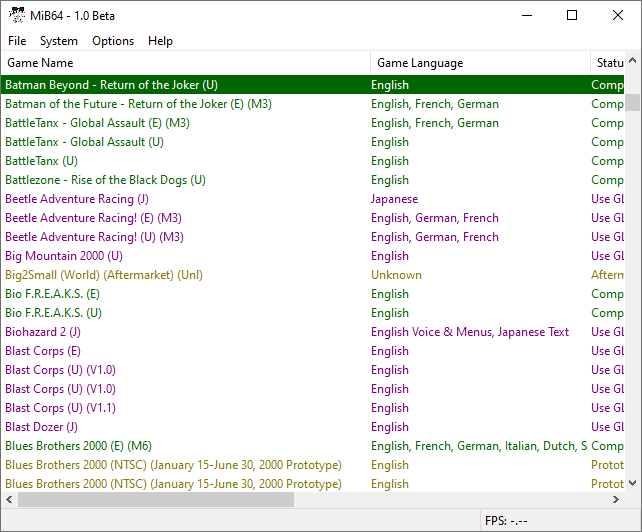
Hover to zoom
Main Window
This section will take you through using MiB64, and Should be straightforward enough.
Starting from the top:
- Title bar shows the internal name of the loaded game, followed by the app title and version number.
- Minimize, maximize (only in Game Browser), and exit buttons.
- File menu: Game loading, Start/End emulation, language selection.
- System menu: Available while emulator is running.
- Options menu: Access to main settings dialog and plugin selection.
- Help menu: Documentation and About info.
- Status bar (lower left): Emulator state feedback and optional CPU load stats.
- FPS counter (bottom right): Displays VI/s (Fields Per Second) of the CPU core—not graphics FPS.
Using the Game Browser
Points:
- The Game Browser does not verify your games! You must use a separate verification utility—MiB64 recommends Verifying Games.
- “Good Name” is a field in the RDS, not a verification method.
- Games are identified by CRC pairs and country code. Bad games with matching codes may appear as good.
- Status, colours, and notes come from the RDS file (editable by advanced users).
- Games marked “Unknown” are likely bad or unverified.
- The Browser uses a cache file in the MiB64 root folder. Refresh manually if game folder contents change.
Status Colour Coding
"Compatible" (green)
The game is, to the best of our knowledge, fully playable, with no issues severe enough to seriously affect gameplay...
"Issues (core)/Issues (plugin)" (muddy yellow)
These games can be played, but they have moderate to severe issues...
"Needs video plugin" (turquoise)
These games are supported on the core but fail with default plugins...
"Needs audio plugin" (turquoise)
Same as above, but for audio. Rare.
"Use (named) plugin" (purple)
Indicates the best plugin for this game.
"Unsupported" (dark red)
Known to fail on the core. No plugin or setting will help.
"Broken (core)/Broken (plugin)" (brown)
Use older MiB64 version or plugin. See Notes.
"Region issue" (blue)
Another version of the game works. Read the note.
"Interpreter only" (medium green)
Game only runs on interpreter core.
"Uncertain" (black)
Status unknown—test manually.
"Unknown" (grey)
Not found in RDS or no status defined. Likely a bad or unverified Game.
Notes Fields
Notes are split into core and plugin fields to reflect separate compatibility layers.
Keep in mind:
- Most text explains known issues.
- Instructions often begin with “use…”—follow them.
- Complex notes may refer you to the GameFAQ (accessible via Help menu).
Abbreviations:
:means “for” → e.g.Framebuffer:flare= “enable Framebuffer for flare”;means “therefore” → e.g.doesn't start; use PAL version= “game doesn’t start, so use PAL version”
Common Shortforms:
"res."= resolution"v."or"ver"= version(E),(U)etc. = GoodN64 country codes"NTSC"= US, Japan, etc."PAL"= Europe, Australia, etc."?"= RDS author was unsure
Game Browser Navigation
- Use mouse (scroll bars, wheel, buttons) or shortcut keys for faster navigation.
- Click column headers to sort—click again to reverse direction.
- The browser is highly configurable.
| Using MiB64 | Start, Stop, Reset Games | Save & Load Games | Using Cheats |
| Taking Screenshots | Multiple Instances | Keyboard Shortcuts | Troubleshooting Stability |