Internal RSP (Reality Signal Processor
Hover to zoom
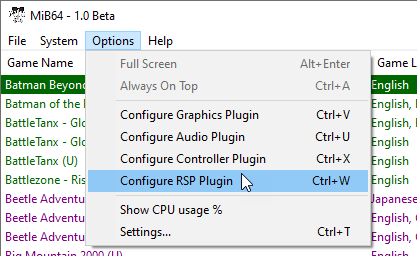
Options > Configure Internal RSP
This page covers configuration of the Internal RSP.
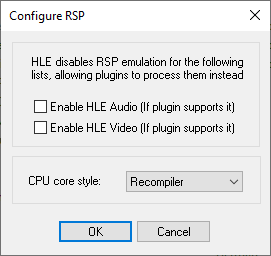
Configure RSP
Hover to zoom
Enable HLE Audio (If plugin supports it)
- Default setting: disabled
- Recommended setting: disabled
If disabled, the RSP will process Alists (provide low level emulated audio output). This generally provides good compatibility and quality.
If enabled, ALists are passed to the audio plugin (for high level emulation). This may provide better performance or extended capabilities, depending on your choice of audio plugin.
Changes take effect instantly.
This setting is saved globally (in the registry) between sessions.
Enable HLE Video (If plugin supports it)
- Default setting: disabled
- Recommended setting: disabled
If enabled, Dlists will be passed to the video plugin (for high level emulation).
This is not usually successful with the default plugin, although it does have some HLE compatibility if needed for slower or lower spec systems.
However, this is almost always the preferred solution for speed and quality with HLE video plugins.
If disabled, the RSP will process Dlists (provide low level emulated graphics output).
This is not usually successful with the default plugin.
This is almost always the preferred solution for quality with the default plugin, but the cost will be speed on lower spec systems.
Changes take effect instantly.
This setting is not saved between sessions.
CPU core style
- Default setting: Recompiler
- Recommended setting: Recompiler
If Recompiler is selected, the RSP will use a separate (low level) recompiling core.
This provides far superior performance. In theory, the recompiler is slightly less compatible than the interpreter, but it has been improved in v1.5 to the point where there are no known limitations—so you should never need to use the interpreter!
If Interpreter is selected, the RSP will use a separate (low level) interpretive core.
Performance is generally significantly lower. See above about compatibility.
Tip: If you do use the RSP interpreter for any reason, you are probably also going to want to use HLE audio to avoid a severe speed penalty.
Changes take effect instantly.
This setting is saved globally (in the registry) between sessions.