N-Rage MiB64 Input Configuration — Controls Tab
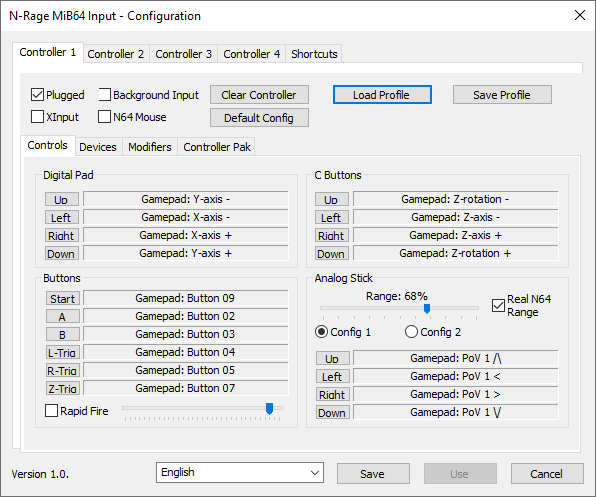
Hover to zoom
Basic Configuration
At the bottom of the window, you’ll find three buttons:
- Save — Stores all changes and closes the window.
- Use — Temporarily applies settings while the emulator is running. Changes are lost if you reset, close the ROM, or load a save state.
- Cancel — Discards all changes.
There’s also a language selector dropdown. If you’ve installed a language pack, select your language, click Save, and reopen the configuration screen. No emulator restart is required.
DirectInput and XInput Support
- DirectInput is selected by default.
- Plugged — Indicates whether the emulator sees the controller. Unchecked means no input is registered.
- Background Input — Allows input even when the emulator window isn’t focused.
- XInput — Enables configuration for XInput-compatible controllers.
- N64 Mouse — Enables N64 mouse support.
Profiles and Defaults
- Clear Controller — Unbinds all keys, modifiers, and settings.
- Default Config — Restores default assignments, modifiers, and sliders. Does not erase mempak data.
- Load Profile — Loads a
.cpffile. Not compatible with versions ≤1.83. Ensure devices are plugged in before loading. - Save Profile — Saves current configuration to a file. Does not include shortcuts.
Controls Tab
To assign a button or stick direction:
- Click the name of the N64 input (e.g., “Start”).
- Press the desired input before the countdown expires.
- To unbind, press ESC during countdown. (ESC cannot be assigned.)
- Rapid Fire — Slider adjusts toggle speed. Checkbox enables rapid fire for all buttons.
- Analog Stick Range — Adjust if characters don’t respond correctly to full stick movement.
- Real N64 Range — Emulates circular stick motion vs. Windows’ square calibration.
- Config 1 / Config 2 — Allows dual analog stick setups, switchable via modifiers.