Configuration: Game Settings
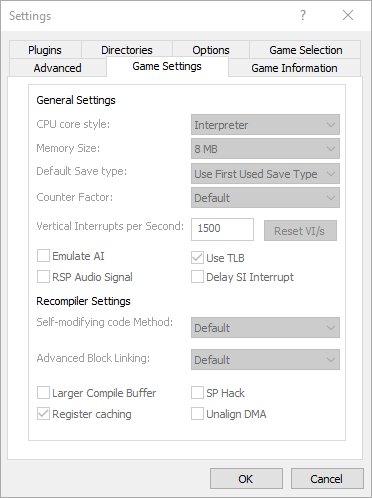
Hover to zoom
This tab is only available if Hide Advanced Settings is unchecked!
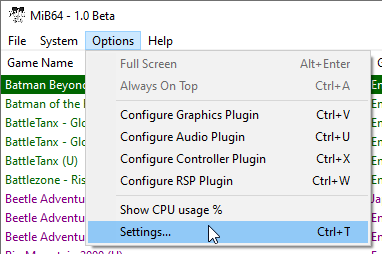
Options > Settings > ROM Settings
This page covers configuration of the core for each individual ROM. Some of these settings are also available under the General tab, and although the settings have the same meaning there, they have a slightly different purpose.
General Settings
- “CPU core style”
- “Memory size”
- “Default save type”
- “Counter Factor”
- Vertical Interrupts per Second
- “Emulate AI”
- “Use TLB”
- “RSP Audio Signal”
- “Delay SI interrupt”
“CPU core style”
Possible settings:
-
- use general setting
- Interpreter
- Recompiler
-
Synchronise Cores (debug builds only)
- default setting: * use general setting (by default: Recompiler)
- generally recommended setting: Recompiler if it works
The Recompiler and Interpreter are two seperate cores in the emulator (although the Recompiler implementation is based on the Interpreter). Generally, any game that works on the Recompiler will also work on the Interpreter, but not always vice-versa. Explaining the difference between a Recompiler and an Interpreter in a general sense is beyond the scope of this document, suffficient to say that the Recompiler is (usually much) faster but (a little) less compatible, the Interpreter (usually much) slower but (a little) more compatible. If you have a fast enough PC that peformance is not an issue for you, you can probably use the Interpreter all the time, but i wouldn’t recommend it since it generally shouldn’t offer much advantage.
Note that if you are using the Interpreter, the following settings are ignored (they are only relevant to the recompiler):
“Memory size”
Possible settings:
-
- use general setting
- 4MB
-
8MB
- default setting: * use general setting (default: 8MB)
- generally recommended setting: 4MB, unless needed.
An emulated RDRAM size of 4MB is the standard amount of memory an N64 console has.
An emulated RDRAM size of 8MB represents an N64 console with the 4MB memory expansion accessory installed, plus the original 4MB. This results in larger state saves and can lower performance. Most games do not benefit at all from the Expansion Pak. Some games require the Expansion Pak (e.g. Zelda2), some games give you more with it (e.g. Perfect Dark), some games just use it to raise resolution (in which case we recommend you don’t use the Expansion Pak since graphics are HLE anyway, see below).
Notes:
- if a game supports the Expansion Pak as an option it will usually tell you in its introduction screens (usually two lines, like “Expansion Pak supported, Expansion Pak detected”). If a game doesn’t support the Pak, or absolutely requires it, it probably won’t say anything.
- you gain nothing by using the Expansion Pak on a game that doesn’t support it - you just waste resources.
- further, if a game has optional Expansion Pak support where the Pak is used only to raise screen resolution, it is generally recommended you set this to No, because there’s no point wasting resources on higher native resolutions when the graphics are high level emulated (hence largely resolution independant) anyway, also it can often cause severe aspect ratio problems in the video plugin.
- in rare cases, for reasons unkown to me, the MiB64 video plugin requires the Expansion Pak to avoid an Access Violation (even in games that don’t use the Expansion Pak). The RDS is already set up for this for all known cases.
- the above two points explain why the setting may sometimes appear to be logically incorrect - it has been set that way for a good reason!
- this setting should already be correctly configured for every game by the RDS, don’t change it unless you know what you’re doing!
“Default save type”
Possible settings:
-
- detect first used type
- 4kbit EEPROM
- 16kbit EEPROM
- 32kbyte SRAM
-
128kbyte FlashRAM
- default setting: * detect first used type
- generally recommended setting: * detect first used type, unless game uses 16kbit EEPROM or a copy protection system that tries to trick the emulator into using the wrong save type.
You can set any of the four possible native cartridge save types here, but the only one that should be needed is 16kbit EEPROM, because it is not possible for the emulator to detect the difference between a game asking for 16kbit and a game asking for 4kbit - MiB64 assumes 4kbit, the more common size. If a game actually needs 16kbit it will either fail to save or not boot unless set to 16kbit EEPROM. The other settings are included for the rare possibility that the autodetect goes wrong - generally, don’t set them. Note that MemPak is treated seperately and will work in addition to whatever is selected here.
“Counter Factor”
Possible settings:
-
- use default (2)
- 1
- 2
- 3
- 4
- 5
-
6
- default setting: * use default (2)
- generally recommended setting: 1 or 2 (possibly 3, see below)
Counter Factor effects the timing in the core, it’s a difficult option to explain, what you need to know is that 2 is the default and best speed you can get in most games without causing problems like missing video frames, 1 is required by some games to prevent flicker or optionally to increase smoothness, and 3 is a possibility for some games to improve performance. Values higher than 3 are likely to cause severe frame loss, leading to instability. But in the hands of experienced users this setting can be used as a crude form of frame-skip. Experienced users only!
Vertical Interrupts per Second
- default setting: 1500
- generally recommended setting: 1500 as it is commonly correct, but can be altered if a different setting is required.
VI/s (Vertical Interrupts per Second) is the emulated rate of speed, in vertical interrupts per second.
A ‘vertical interrupt’ Is the row-by-row refresh of pixels drawn on the emulated screen.
The default VI/s setting is 1500, and is recommended to be left alone.
MiB64 was originally designed for the end user to not be tweaking this setting, so as a result, it was set with at a secure default. But with current development as it is, we have decided to allow the end user the right to have access to the setting.
“Emulate AI”
Possible settings: checked or unchecked
- default setting: unchecked
- generally recommended setting: unchecked, unless needed
This option was added in v1.6.1 to fix sound/speech issues in some games. It is required by Hydro Thunder, Tarzan, Top Gear Rally, Resident Evil 2, and TWINE. If you are not playing one of these games, leave it off.
“Use TLB”
Possible settings: checked or unchecked
- default setting: checked
- generally recommended setting: checked if needed, unchecked otherwise
This option enables emulation of the Translation Lookaside Buffer (TLB), a memory management feature used by some games. It is required by games like Goldeneye and Mario, but not used by games like Zelda and Banjo. Disabling it may improve performance if not needed.
“RSP Audio Signal”
Possible settings: checked or unchecked
- default setting: unchecked
- generally recommended setting: unchecked for most games
This option enables sound/speech in Musyx games. It is required by Hydro Thunder, NBA Showtime, Tarzan, TWINE, and Resident Evil 2. If you are not playing one of these games, leave it off.
“Delay SI interrupt”
Possible settings: checked or unchecked
- default setting: unchecked
- generally recommended setting: unchecked, unless needed
This option was added in v1.5 to fix games broken in v1.4. It is required by Cruis’n USA. If you are not playing that game, leave it off.
“Self -mod. code method”
Possible settings:
-
- use general setting
- None
- Cache
- Check Memory & Cache
- Check Memory Advance
- Change Memory & Cache
-
Protect Memory
- default setting: * use general setting (default: Check Memory Advance)
- generally recommended setting: game dependant
This setting controls how the emulator handles self-modifying code. The methods range from fast to secure. Protect Memory is the most secure but also the slowest and may break some games. Cache may be needed even for non-self-modifying games if Advanced Block Linking is off. Trial and error may be required to find the best setting for a particular game.
“Advanced Block Linking”
Possible settings:
-
- use general setting
- Off
-
On
- default setting: * use general setting (default: On)
- generally recommended setting: highly game dependant! (see below)
Advanced Block Linking is one of MiB64’s speed optimisation techniques - it usually provides a speed vs. smoothness tradeoff that you’d want to set globally (for all games) under the General tab, according to whether you have a fast or slow PC. On is usually (often significantly) faster than Off but may be less smooth. This depends on the game. Afew games run particularly badly with this On, or may require this to be On or Off, which is why the RDS sometimes does set this control.
“Larger Compiler Buffer”
Possible settings: checked or unchecked
- default setting unchecked
- generally recommended setting: unchecked unless it helps
Some games generate particularly complex code structures which tend to overlow the default 20MB compiler buffer and temporarily stall the system, causing a pause in gameplay. By enabling this a game will be given a 50MB buffer, which obviously increases resource usage but may help reduce occurence of overflows and thus improve performance. Most games do not need more than 20MB hence this will usually only waste resources
“SP hack”
Possible settings: checked or unchecked
- default setting: unchecked
- generally recommended setting: unchecked (to avoid failure)
This is simply as a performance feature - enabling it gives typically 5% more speed from the core, however a large numbe of games will not be stable with it enabled, therefore it’s not set often. Try it if you are desperate for speed, but for most people most of the time it’s recommended you leave it off.
“Register Caching”
Possible settings: checked or unchecked
- default setting: checked
- generally recommended setting: checked, unless it causes a failure.
Probably the recompiler’s most significant optimisation technique, register caching usually dramatically improves the efficiency of the recompiler, and usually without side effects. The reason this is included as an option is that sometimes register caching will produce an error in a game. Register caching can cause many kinds of obscure errors, such as events in a game not triggering, or a game becoming stuck in a loop, or graphics being messed up, aswell as obvious errors such as a crash. If you find you are having stability problems with the recompiler and not the interpreter, try disabling register caching to see if you can get past the point/game with at least some of the performance of the recompiler.
“Unalign DMA”
Possible settings: checked or unchecked
- default setting: unchecked
- generally recommended setting: unchecked, unless it is an old SM64 ROM Hack that needs it.
This option, when checked, allows support for old SM64 ROM hacks with faulty alignment due to a bad file size extension tool. It is recommended to keep this option unchecked (default) if not playing an old SM64 ROM hack as it will incorrectly manipulate hardware behaviour, leaving many games unable to function properly.